How to Check Facebook Account Creation Date Easily
Learn how to find the exact date a Facebook account was created with simple steps. Check account age quickly and verify profiles today.

How to Check the Creation Date of a Facebook Account
If you have ever wanted to know when a Facebook account was created, you are not alone. Many users check this information when reviewing an old profile, verifying an account before buying it, or simply satisfying their curiosity about when they first joined the platform. Knowing the account creation date can also help marketers, account managers, and social media professionals evaluate how old and potentially trustworthy a profile is.
In this guide from AUTOFB.PRO SMM PANEL, you will learn practical ways to view a Facebook account's join date, including a quick method that shows the month and year and another method that may reveal the full day, month, and year.
Why the Facebook Join Date Matters
The age of a Facebook account can be useful in several situations. For personal users, it is an interesting way to revisit your digital history. For businesses and marketers, it can be an important checkpoint when reviewing profiles used for advertising, community management, or outreach.
- Account verification: Older accounts often appear more established than newly created ones.
- Buying or renting accounts: Some people want to confirm that an account is not brand new before making a decision.
- Security checks: A suspiciously new account may require extra caution.
- Personal curiosity: Many users simply want to know when they joined Facebook.
While account age alone does not guarantee quality or safety, it is still a useful detail when combined with other checks such as profile activity, friend network, posting history, and authenticity.
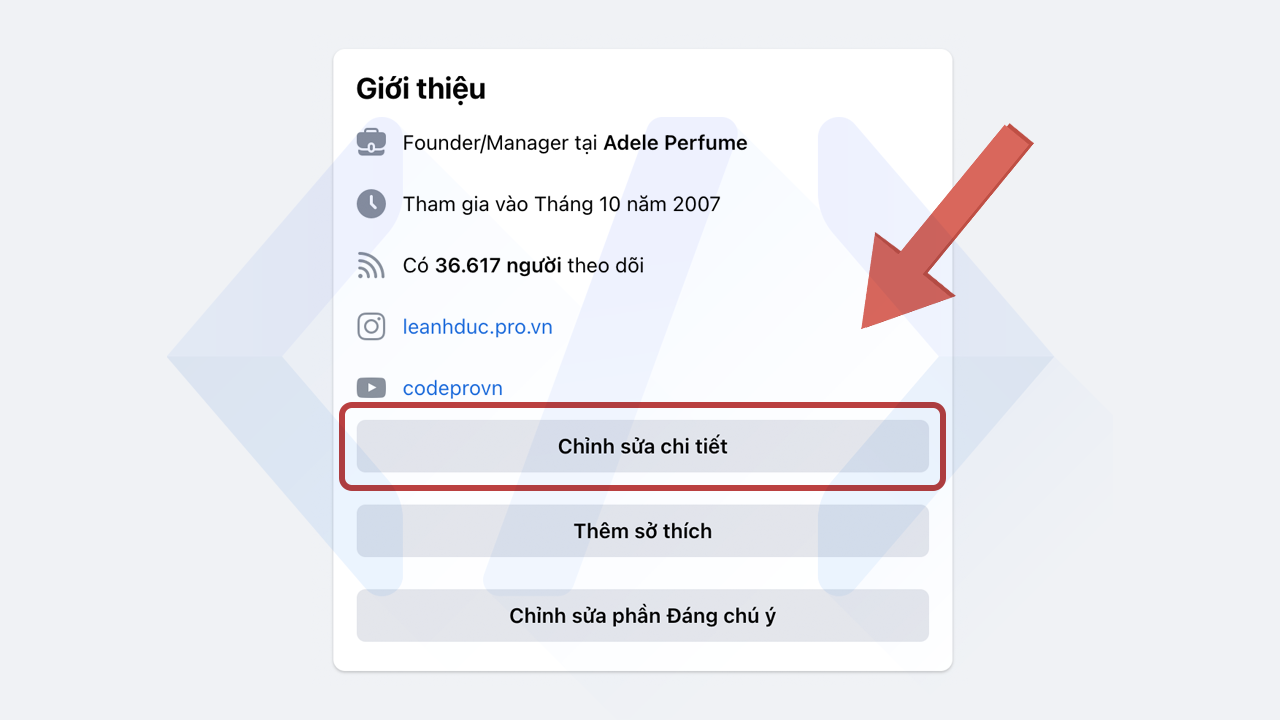
Method 1: Check the Join Date in the Profile Intro or About Section
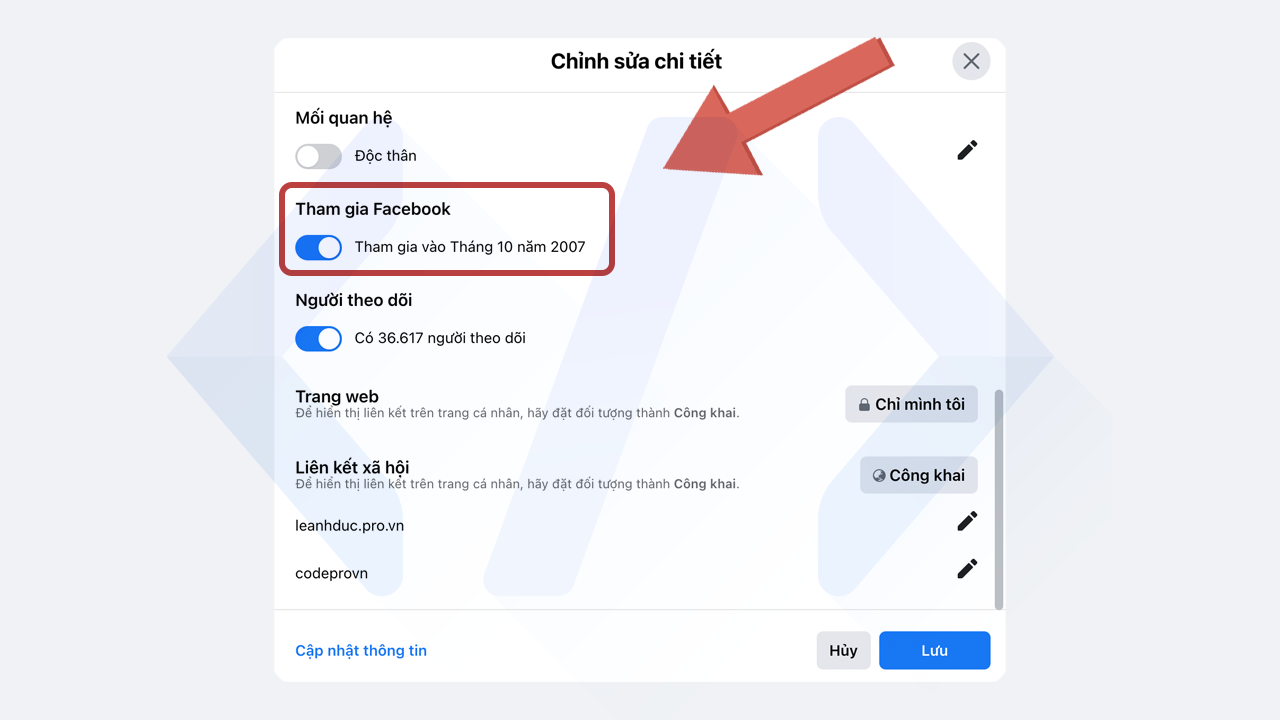
This is the fastest option and works well if you only need a general idea of how old the account is. In many cases, Facebook shows the month and year the account joined the platform.
Steps to follow
- Open the Facebook profile you want to review.
- Go to the About section of the profile.
- Look for profile details or personal information.
- Find the line that mentions when the user joined Facebook.
Depending on the current Facebook layout, this information may appear under profile details, intro details, or an editable information panel. On some accounts, you may need to click an option similar to Edit Details or See More About Info.
This method is useful because it is quick and easy. However, it does not always show the exact day the account was created. In many cases, Facebook only displays the month and year, which may still be enough if you are just checking how old the account is.
When this method is enough
If your goal is to estimate account age for general review, the month and year are often sufficient. For example, if a profile shows it joined Facebook in March 2016, you already know it has several years of history. That can help you compare it with newer accounts and make better decisions.
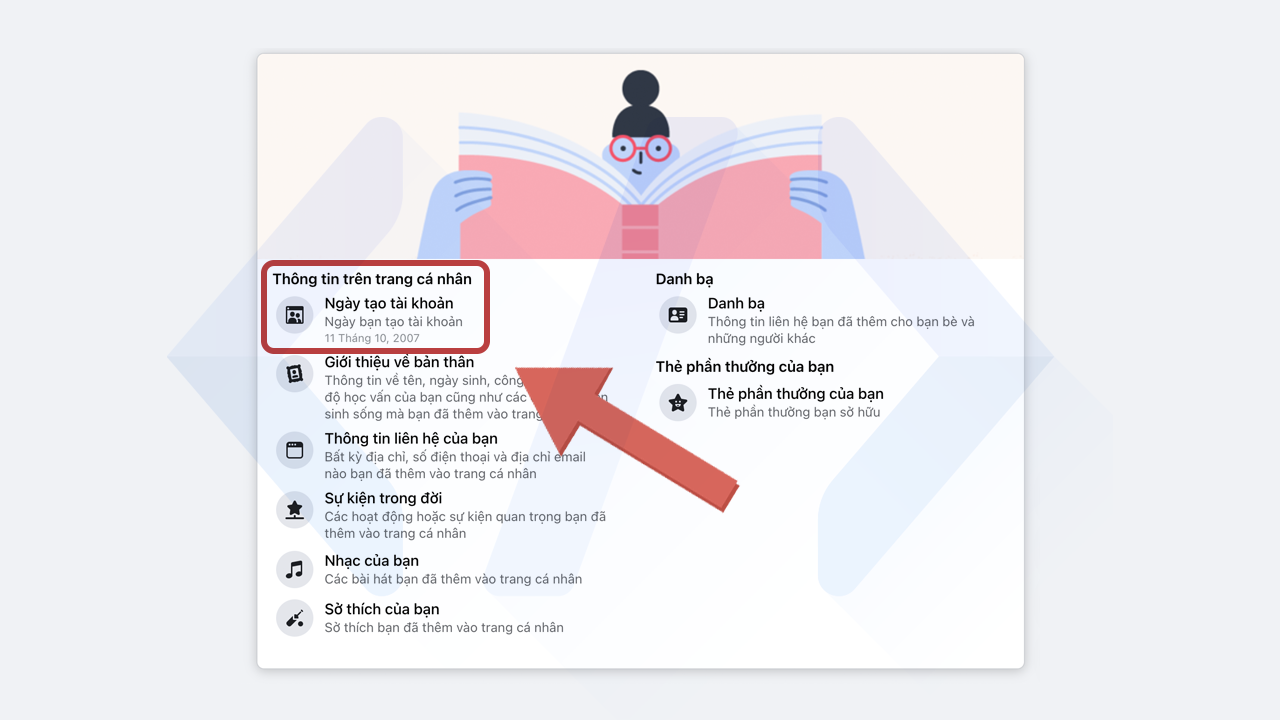
Method 2: Check Facebook Personal Information for the Exact Creation Date
If you need more precise details, there is another method that may display the full account creation date, including the day, month, and year. This approach is more detailed and is the better choice if you are doing a careful account review.
Steps to check the exact date
- Log into the Facebook account you want to inspect.
- Go to the account settings or profile information area.
- Open the section related to Your Facebook Information or Personal Information.
- Look for account details that mention when the profile was created or when you joined Facebook.
In some Facebook versions, this information may appear in the account information area rather than directly on the public profile. Because Facebook regularly changes its interface, the exact path can vary slightly between desktop and mobile devices. Still, the main idea remains the same: review the account's personal information section to find the most detailed join date available.
This method is generally more accurate than checking the public About section because it may show the exact date instead of just the month and year.
Can You Check Another Person's Facebook Creation Date?
Sometimes yes, but not always in full detail. Public profile sections may reveal the month and year if the user has not restricted that information. However, the exact day of account creation is usually easier to see from inside the account itself. Privacy settings and Facebook interface updates can limit what is visible to other people.
If you are checking another account, remember that public data can be incomplete. For a more reliable review, combine the join date with other visible signals:
- How far back the posts go
- Whether the account has normal friend activity
- The consistency of profile photos and comments
- Signs of real long-term engagement
Tips for Evaluating a Facebook Account Beyond the Creation Date
The creation date is helpful, but it should never be the only factor you rely on. Whether you are a marketer, reseller, or account manager, it is smarter to examine the full profile picture.
What else to review
- Timeline history: Older posts can show whether the account has been active over time.
- Profile completeness: A filled-out profile usually looks more natural than an empty one.
- Friend and follower patterns: Unusual spikes can be a warning sign.
- Recent activity: A very old account with no real activity may still be low quality.
- Security status: Check whether the account has stable login history, verified contact details, and no obvious restrictions.
For professionals using social media for promotion and growth, these checks can save time and reduce risk. At AUTOFB.PRO SMM PANEL, we always recommend careful evaluation before using any account for campaigns, engagement work, or business operations.
Desktop vs Mobile: Is the Process Different?
The basic logic is the same on both desktop and mobile, but the menu names and layout may look different. On desktop, Facebook often spreads profile details across the About section and account settings. On mobile, some details may be hidden inside expandable panels or account menus.
If you cannot find the join date right away, try these simple adjustments:
- Switch from the Facebook app to a mobile browser
- Check both the public profile and account settings
- Use the search function in settings if available
- Look under sections labeled Personal Information, Profile Info, or Your Information
Because Facebook updates its design frequently, patience matters. The information is often still there, just moved to another menu.
Common Reasons You Cannot See the Creation Date
If the date is missing, there could be a few reasons:
- The account owner limited profile visibility through privacy settings
- Facebook changed the layout and the data is in another section
- You are checking from outside the account and only partial information is public
- The app version you are using does not show the same details as desktop
When this happens, use both methods described above and compare what is visible in the profile and settings. In many cases, one of them will provide at least the month and year.
Best Use Cases for Marketers and Social Media Managers
For digital marketers, account age is more than a curiosity. It can be part of a smarter account screening process. If you manage outreach, ads, brand engagement, or community operations, knowing whether an account is newly created or long established helps set expectations.
For example, an account created many years ago with real posting history may look more credible than a profile made last week. That does not automatically make it better, but it is an important signal. Combined with proper warming, realistic activity, and compliance, account age can support a more stable social media strategy.
If you are building campaigns and need social growth support, AUTOFB.PRO SMM PANEL can help streamline your workflow with practical SMM solutions tailored to modern platforms.
Final Thoughts
Checking the date a Facebook account was created is simple once you know where to look. If you just need a quick estimate, the profile About section often shows the month and year joined. If you want the most precise result, review the account's personal information or settings area, where Facebook may display the exact day, month, and year.
Whether you are checking your own account, verifying a profile, or reviewing account age for marketing purposes, this small detail can be surprisingly useful. Use it as one part of a broader evaluation, not the only factor. A smart review always considers profile quality, activity history, and authenticity alongside the creation date.
If you found this guide useful, keep following AUTOFB.PRO SMM PANEL for more practical social media tips, platform tutorials, and account management insights.
 Cách xem ngày tháng năm tạo tài khoản Facebook cách 2 bước 2
 Cách xem ngày tháng năm tạo tài khoản Facebook cách 1 bước 1
 Cách xem ngày tháng năm tạo tài khoản Facebook cách 1 bước 2